Personalization, Variables & Spintax
Deliveryman AI helps every email sound personal and natural, even when you are sending at scale.
Variables automatically add details like the recipient’s name, company, or custom data, so each message feels written just for them.
Spintax rotates different versions of the same line, keeping your emails fresh and unique.
Together, they help your outreach feel human, not automated, no matter how big your campaign is.
Together, they help you send thousands of emails that sound human, boost deliverability, increase reply rates, & avoid spam patterns by ensuring no two emails look the same.
You cannot add personalization within Spintax at the moment. However, this will be supported in the future.
Variables
Variables are placeholders that Deliveryman AI automatically replaces with real data. When you use variables in your emails, each message becomes personalized for every recipient without any manual editing.
Deliveryman AI provides two types of variables:
- Your List Tags
- System Tags
Your List Tags (Your Contact List Variables)
Your List Tags pull information directly from your contact list. Make sure you map all important fields when creating your contact list, because these mapped columns become your Your List Tags. They allow you to personalize your email campaigns by inserting each recipient’s real data.
Personalizing emails at scale lets you automatically fill in relevant details for every contact, making each message feel uniquely written for the recipient. This level of customization improves engagement, increases trust, & reduces the chances of your emails being flagged as spam due to generic or repetitive content.
List Tags help make your emails feel more personal & relevant to each recipient.
Examples:
{{First Name}}{{Last Name}}{{Website}}{{Company Name}}{{Job Title}}
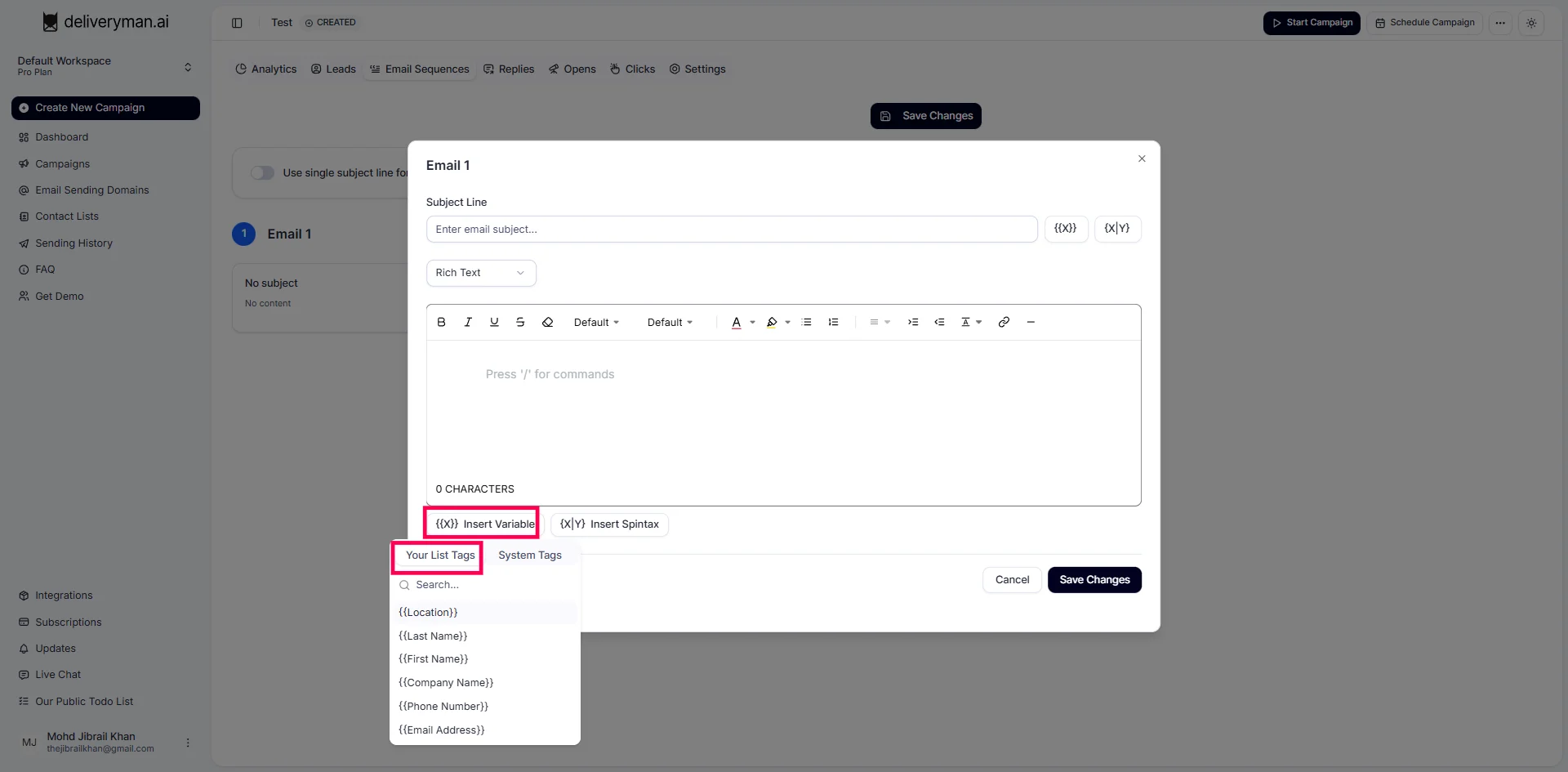
But don’t worry, you don’t need to remember any of these tags. All the relevant tags based on the contact list you select for your campaign will automatically appear in the email editor (see screenshot below).
System Tags (Built-In System Variables)
System Tags are additional tags outside of your contacts list. They pull real-time information from the platform or your account, allowing you to add dynamic & current details to your emails. This helps take personalization to the next level & keeps every message unique, accurate & effective.
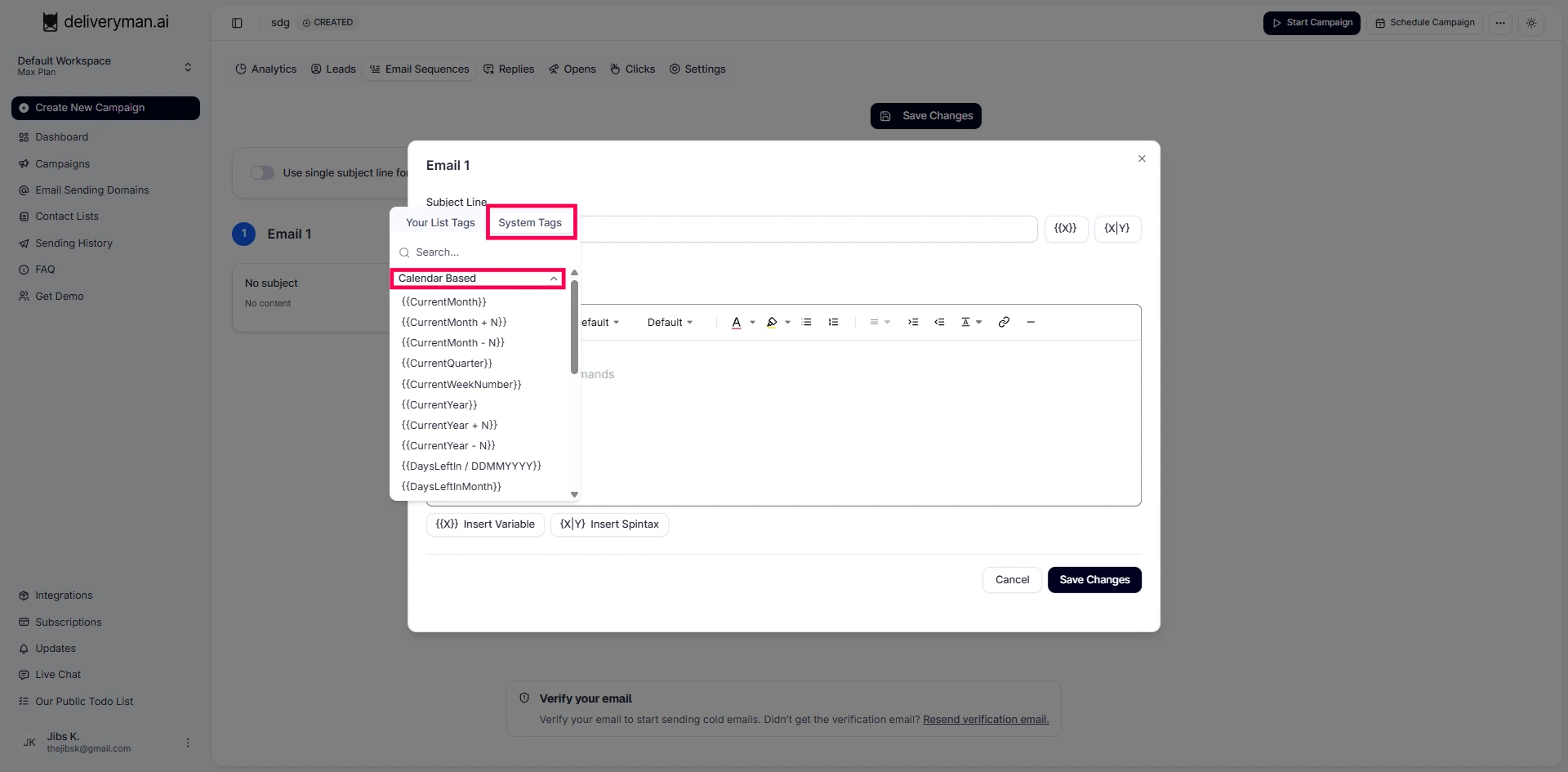
The following are the system tags that Deliveryman AI provides for users to add real-time, dynamic information to their emails:
Calendar Based
| Tag | What it does |
|---|---|
{{CurrentMonth}} | Displays the current month name (e.g., January) |
{{CurrentMonth + N}} | Displays the month after N months (Replace N with number of months) (e.g. {{CurrentMonth + 2}} is March) |
{{CurrentMonth - N}} | Displays the month before N months (Replace N with number of months) (e.g. {{CurrentMonth - 2}} is November) |
{{CurrentQuarter}} | Displays the current quarter (e.g., Q1) |
{{CurrentWeekNumber}} | Displays the current week number of the year (e.g., if it's 10th January, then it's Week No. 2) |
{{CurrentYear}} | Displays the current year (e.g., 2025) |
{{CurrentYear + N}} | Displays the year after N years (Replace N with number of years) (e.g. {{CurrentYear + 2}} is 2027) |
{{CurrentYear - N}} | Displays the year before N years (Replace N with number of years) (e.g. {{CurrentYear - 2}} is 2023) |
{{DaysLeftin / DDMMYYYY}} | Displays number of days left until the given date (Replace DDMMYYYY with a date, e.g., 12012025 for 12 January 2025). So, if today is 10 January 2025 then {{DaysLeftin / 12012025}} is 2 |
{{DaysLeftInMonth}} | Displays number of days left in this month (e.g., if today is 10 January 2025 then Days Left In Month is 21) |
{{DaysLeftinQuarter}} | Displays number of days left in this quarter (e.g., if today is 10 January 2025 then Days Left in Quarter is 80) |
{{EndOfMonthDate}} | Displays the last date of the current month (e.g., if it’s January then End Of Month Date is Friday, 31 January 2025) |
{{EndOfQuarterDate}} | Displays the last date of the current quarter (e.g., if it’s January then End Of Quarter Date is Monday, 31 March 2025) |
{{NextQuarter}} | Displays the next quarter (e.g., Q2) |
{{NextWorkingDate}} | Shows next working date (e.g., if today is Friday, 10 January 2025 then Next Working Date is Monday, 13 January 2025) |
{{NextWorkingDate + N}} | Shows the working date after N days (Replace N with number of days). Example: if Next Working Date = Monday, 13 January 2025 then {{NextWorkingDate + 2}} is Wednesday, 15 January 2025 |
{{NextWorkingDate - N}} | Shows the working date before N days (Replace N with number of days). Example: if Next Working Date is Monday, 13 January 2025 then {{NextWorkingDate - 2}} is Saturday, 11 January 2025 |
{{PreviousQuarter}} | Displays the previous quarter (e.g., Q4) |
{{PreviousWorkingDate}} | Shows previous working date (e.g., Thursday, 09 January 2025) |
{{PreviousWorkingDay}} | Shows previous working day (e.g., Thursday) |
Sender Information
| Tag | What it does |
|---|---|
{{SenderEmail}} | Shows the sender’s email address |
{{SenderFirstName}} | Shows the sender’s first name |
{{SenderFullName}} | Shows the sender’s full name |
{{SenderLastName}} | Shows the sender’s last name |
Time Based
| Tag | What it does |
|---|---|
{{CurrentDate}} | Displays the current date (e.g., Friday, 10 January 2025) |
{{CurrentDate + N}} | Displays date after N days (Replace N with number of days, e.g., {{CurrentDate + 2}} is Sunday, 12 January 2025) |
{{CurrentDate - N}} | Displays date before N days (Replace N with number of days) (e.g., {{CurrentDate - 2}} is Wednesday, 08 January 2025) |
{{CurrentGreeting}} | Displays a greeting like Good Morning or Good Evening |
{{CurrentTime}} | Displays the current local time |
{{CurrentTimePeriod}} | Displays the current part of the day (e.g., Morning, Afternoon, etc.) |
{{Today}} | Displays today’s date (e.g., Friday, 10 January 2025) |
{{Tomorrow}} | Displays tomorrow’s date (e.g., Saturday, 11 January 2025) |
{{Yesterday}} | Displays yesterday’s date (e.g., Thursday, 09 January 2025) |
Spintax
Spintax is a way to create multiple versions of the same sentence or phrase.
It allows you to write one line of text that has several interchangeable variations.
Deliveryman AI then randomly selects a version for every email, meaning no two emails look identical.
Adding variation to your content makes your emails look more natural & less automated, which helps improve inbox placement by avoiding repetitive patterns. This keeps your large-scale outreach human & unique while also making your campaigns safer from spam filters.
Spintax is especially useful when sending high volumes, because identical content across many recipients can hurt deliverability.
Creates random variations of your message using this format:
{word1|word2|word3}
Example: Hope you have {a great|an amazing|a wonderful} day!
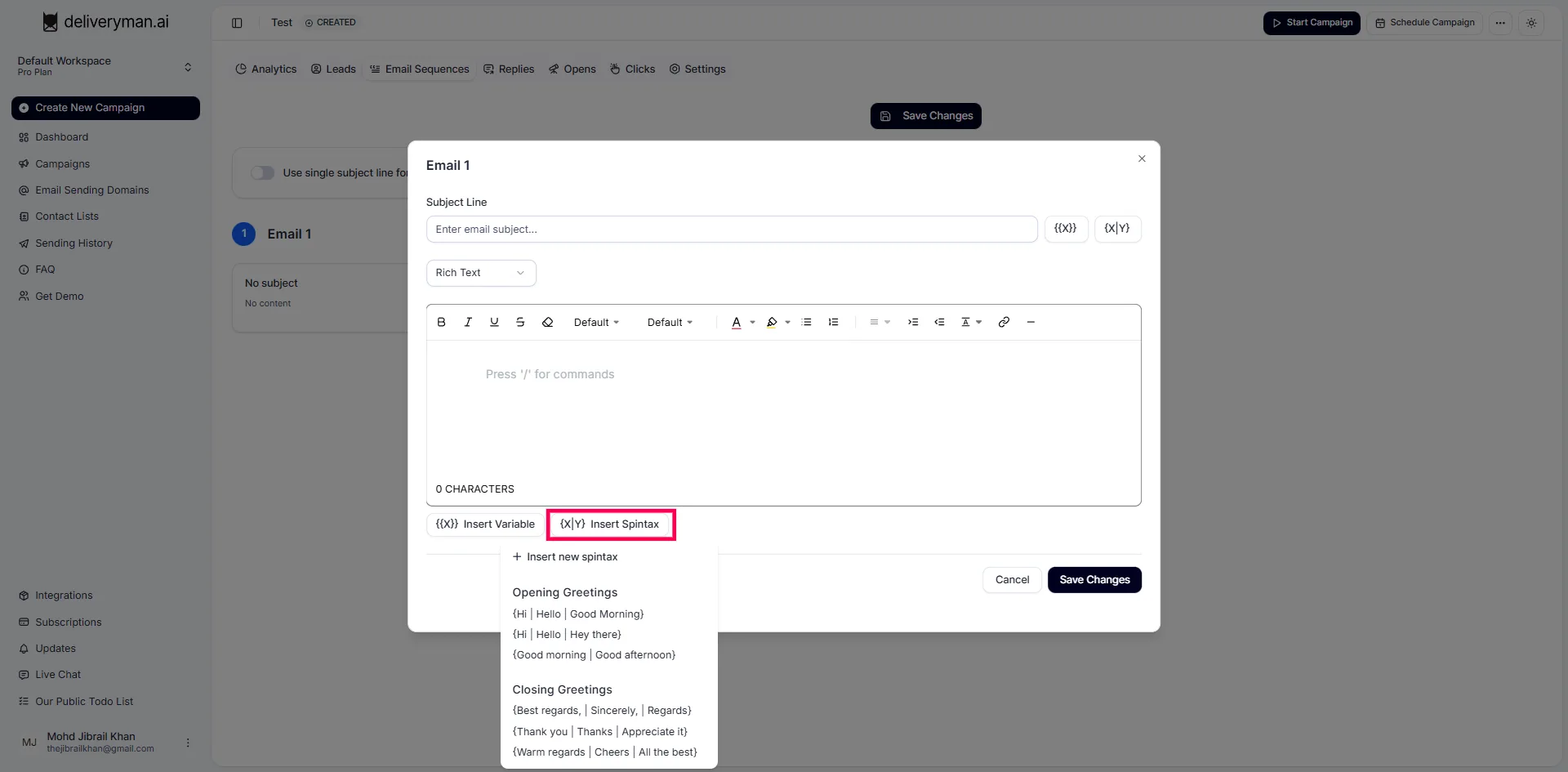
We also have some spintax templates that you can use. (See screenshot below)